Download Instagram Videos
Free, Lossless Audio Quality, Simple, Fast, HD
Operation Help | How to Find Cookie (sessionid)
1. Open Chrome browser on your computer

2. Go to Instagram and log in

3. Right-click on the page and select "Inspect" (or press "F12" key)

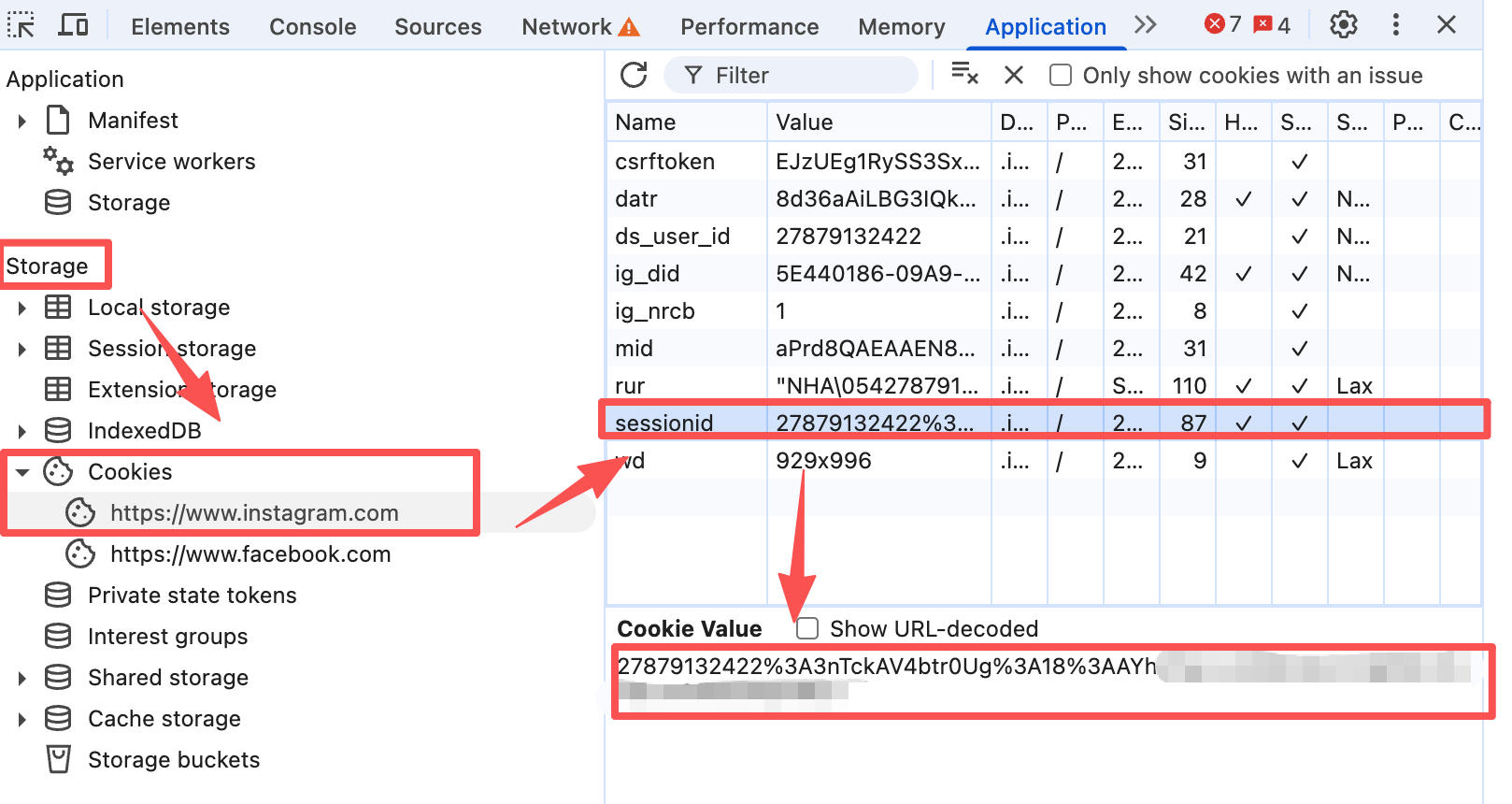
4. (As shown in the image below) Select the "Application" tab

5. Select "Cookies" on the left

6. Find the "sessionid" value and copy it

7. Return to our page, paste the "sessionid" value, enter the Instagram post link, and click download

8. For more issues, see "Frequently Asked Questions" below

Disclaimer: Your Cookie (sessionid) is only stored on your device
Why Choose Us?
The best tool for downloading Instagram videos!
Easy to Use
Just need the video link to parse out the original watermark-free video
Fast and Stable
Multiple parsing routes, fast response support
Free to Use
Bookmark this site, remember https://grabclip.com, and use it anytime
Frequently Asked Questions
Why does a parsing error occur?
Make sure the video you need to download is public and has not been deleted, then refresh the browser (web page) and try parsing again.
Why is there no response after clicking the download button?
If there is no download or other response for a long time after clicking download, please try clicking "Backup Download", or click "Video Link" to open and save directly in the browser.
Where are videos downloaded on iOS?
On mobile devices, please open our website in your phone's default browser. There should be a pop-up prompt when downloading. Afterwards, you need to pay attention to the download icon ↓ on the left side of the address bar. After completing the download, the downloaded video will be saved in your phone's "Files" (you can also see this by clicking the ↓ button in the address bar). Open the downloaded video file, click share, then click save to Photos to view it in your photo album.
Do I need to pay to download watermark-free videos/audio?
No, we are a free online application. You only need to bookmark our website and use it anytime, anywhere without any restrictions. For the good development of the website, please add our website to the whitelist of ad blocking plugins. Thank you for your support.
What link formats are supported for download?
We support the following formats:

https://www.instagram.com/p/DLkpseLSHYU/
https://www.instagram.com/reel/DLkpseLSHYU/
https://www.instagram.com/isabridal.official/reel/DQE-Q2kkWhf/
Recent Posts
Download Weibo Videos More Easily: GrabClip Launches the Weibo Video Parser Chrome Extension
If you often download videos from Weibo, there is now a simpler way to do it. GrabClip has launched a new Chrome extension called Weibo Video Parser. ...
Download Xiaohongshu Videos Without Watermarks More Easily: GrabClip Launches the Xiaohongshu Video Parser Chrome Extension
If you often work with Xiaohongshu video links, there is now a simpler way to do it. GrabClip has launched a new Chrome extension called Xiaohongshu V...
How to Batch Download TikTok Videos and Automatically Save Them to Google Drive
Many GrabClip users eventually run into the same problem: They need to save a lot of TikTok videos. For example: Collecting creative inspiration Sav...
GrabClip Extension Series (Part 2): Facebook Reels Parser — Process Reels Links Faster
To make GrabClip more convenient for frequent users, we built two Chrome extensions: TikTok Video ParserFacebook Reels Parser The first blog introduc...
GrabClip Launches a Chrome Extension for Faster TikTok Video Downloads
If you often use GrabClip to download TikTok videos, you probably know the most time-consuming part is not the download itself, but the repeated steps...